
Posts
2220Following
155Followers
75Also @noisytoot@mice.tel in case chinchillas eat the cables
Noisytoot
noisytoot
 0
0
 0
0
 1
1
 repeated

Amber  (kemona_halftau)
kemona_halftau@sharkey.skydevs.me
Show content
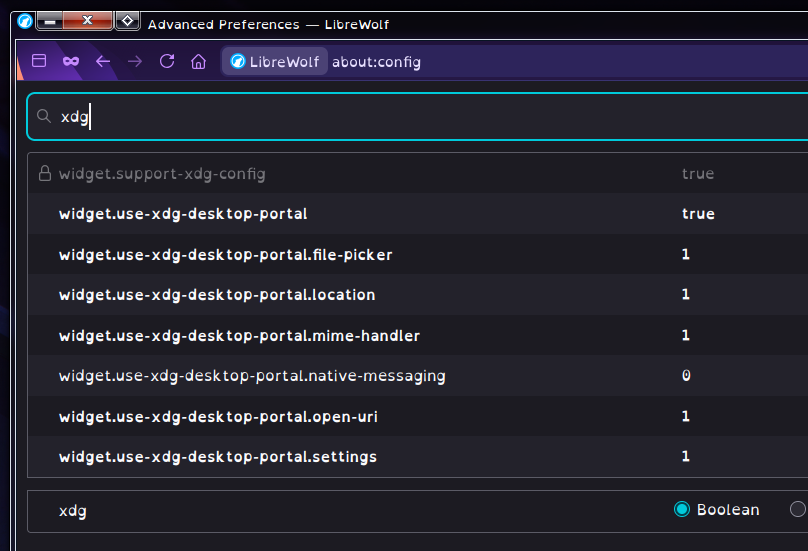
i don’t like gnome/gtk/libadwaita ui components, they are extremely unpleasant to use, but i especially do not like the gnome/gtk file selector, it is almost unusable, so normally, when using firefox or a firefox-based browser, i change these settings in about:config shown in the screenshot to force the browser to use the xdg desktop portal file selector, which is usually either the lxqt one or the kde one depending on which desktop i’m using
however, i recently updated to librewolf 152, and despite my about:config not changing, librewolf is now using the gnome file selector both when downloading a file and when selecting files to upload somewhere
how should i fix this? i have tried changing these values from 1 to 2 and to 0, nothing changed. other programs use desktop portals just fine, so i’m not sure what is causing this
i dont see any relevant messages in stderr of the terminal i opened librewolf from, not sure if there is a log file i should be checking instead or something
 3
5
0
3
5
0
Noisytoot
noisytootShow content
0
0
1
Noisytoot
noisytootplease tell me if you find a M.2 wifi card that works well with linux-libre. the only one I'm aware of is the QCNFA222, which has broken 5GHz and spams errors in dmesg unless you disable ASPM (or at least the AzureWave version does, maybe there are others. the mPCIe version of the AR9462 works fine)
(also, I'm not aware of any wifi+bluetooth card where both wifi and bluetooth work with linux-libre)
0
0
1
repeated

dmiException 💽
domi@donotsta.re
3
2
0
repeated

Nina Kalinina
nina_kali_nina@tech.lgbtDo you see many happy EMF Camper goers with their 4 digit local phone numbers in your Fedi feed? Do you feel FOMO on not being able to participate in the telephony fun?
If the answer is "yes" to both questions, consider calling 0114 501 xxxx - where xxxx is the 4-digit #EMFCamp phone. If you're outside of the UK, the number to call is +44 114 501 xxxx
E.g. you can listen to an automatic announcement by calling to +441145017425 ("RICK")
3
6
0
Noisytoot
noisytoot
1
0
1
Noisytoot
noisytoot
1
0
1
Noisytoot
noisytoot
1
0
1
Noisytoot
noisytootWARNING: database "akkoma" has a collation version mismatch
DETAIL: The database was created using collation version 2.42, but the operating system provides version 2.43.
HINT: Rebuild all objects in this database that use the default collation and run ALTER DATABASE akkoma REFRESH COLLATION VERSION, or build PostgreSQL with the right library version.