

Me: I wonder how I make an appimage
Reddit: Read the documentation
Me: Well that's straightforward
The documentation: Use appimage-builder. Use linuxdeploy. Build it from source. To build it from source, use appimage-builder. linuxdeploy can help you build from source. As you can see, building an appimage is very easy and works with the tools you already have. Create an AppDir but this should be a last resort. Here are a large number of example YAML files but no explanation of their structure
 6
6
 0
0
 0
0




Okay but seriously:
- Do I use appimage-builder or linuxdeploy to make an appimage. What's the difference.
- Am I expected to know what an "AppDir" is before making an appimage / reading the appimage docs
What I have is a directory containing a luajit executable, source to build a small C library, two SDL.so files I'd like to use as-is and some lua files. I want to package them in a way that removes any dependency on my laptop's specific libc/etc and I'm made to understand appimage does this
3
0
0

Alex Wilson
alex@gotosocial.theonecurly.page
@mcc Please post if you ever figure this out. I tried this several years ago and gave up in frustration.
1
0
0

Conchoid
conchoid@mastodon.gamedev.place@mcc Isn't there an "appimagetool" as a third option?
0
0
0

Josh Simmons
dotstdy@mastodon.social@mcc I don't believe appimage lets you avoid depending on a specific version of the host's libc, unless you're building in a container. (and if you're building in a container then it doesn't matter whether you use appimage or not)
2
0
0
@dotstdy I thought the whole point was the appimage contained its own libc.
2
0
0
Josh Simmons
dotstdy@mastodon.social@mcc appimage-builder seems like not what you want, that seems to try to bundle the entire host platform inside the container, which doesn't make any sense for graphical applications which need to depend on the host gpu drivers.
0
0
0
Josh Simmons
dotstdy@mastodon.social@mcc That cannot work because your gpu driver needs to link with libc, and your app too. You're pretty much forced to depend on the host libc if you want to make an application on Linux that uses graphics. (This is also broadly why static linking with musl doesn't work)
1
0
0
@dotstdy Then how do the various games I have seen ship appimages work?
2
0
0
Josh Simmons
dotstdy@mastodon.social@mcc they don't bundle libc, the dependency on the libc version is easy enough to avoid, you build on a version of the OS that's old enough and rely on glibc versioning to deal with the compatibility.
2
0
0

Josh Simmons
dotstdy@mastodon.social@mcc e.g. building inside a container, or by creating a sysroot for the min-version you want to support and using that during the build rather than the host libc.
0
0
0
@dotstdy Okay. It seems to me that if I link against an old glibc, and so it works on my glibc and older glibcs, then this means I have removed the dependency on my laptop's specific libc/etc, and I'm okay forcing musl users to build from source. Imagine this is the only version of the operating system I have available and I don't have "a container".
docs.appimage.org claims using appimage-builder "removes the limitations of requiring an old system to compile the binaries". Should I use that?
1
0
0
Josh Simmons
dotstdy@mastodon.social@noisytoot @mcc yep, on any sane platform what would happen is that at build time you'd say "--target-libc-version = 1.2.3" and then the compiler environment would sort out the versions for you. but alas that's not how it works so you need to do a bunch of faffing around one way or another. (there's i guess, 3 major approaches, 1. versioning manually the symbols you need, 2. building in a vm or container with an old os version. or 3. creating a sysroot with a copy of the libc you want to target)
0
0
1
Josh Simmons
dotstdy@mastodon.social@mcc no you should not use that, it will break your gpu drivers. :)
1
0
0
Josh Simmons
dotstdy@mastodon.social@mcc like what that tool is doing afact is that it's vendoring every library from the host that you use into your appimage. but you cannot vendor mesa or libc (because mesa depends on libc), as mesa needs to be able to update independently from your appimage in order to support new hardware and whatnot.
1
0
0
Josh Simmons
dotstdy@mastodon.social@mcc basically appimage is just an executable zip file. so all the regular build stuff for creating a portable package for Linux needs to happen in your own stuff. the usual approach there being pulling an image for some old debian or ubuntu version, and then building your binaries inside that container / vm.
1
0
0
@dotstdy I understand that but I was hoping that due to the large amount of tooling around appimages (including two separate tools which the appimage documentation, in self-contradiction, tells you to use) that some of that tooling would attempt to address these fundamental problems
2
0
0
@dotstdy I guess my questions are
1. If I run ldd on the three binary files I have, ranging in age from last week to 2013, they all claim to link libc.so.6. Does that mean they all depend on the same libc version? If not, how do I test an executable to see what libc it builds on?
3
0
0
Josh Simmons
dotstdy@mastodon.social@mcc yeah alas no, all the times where people talk about there being an easy solution is only because they don't care about applications which need to depend on gpu drivers (or any other library that needs to update with the host, rather than with the container / package / whatever)
0
0
0
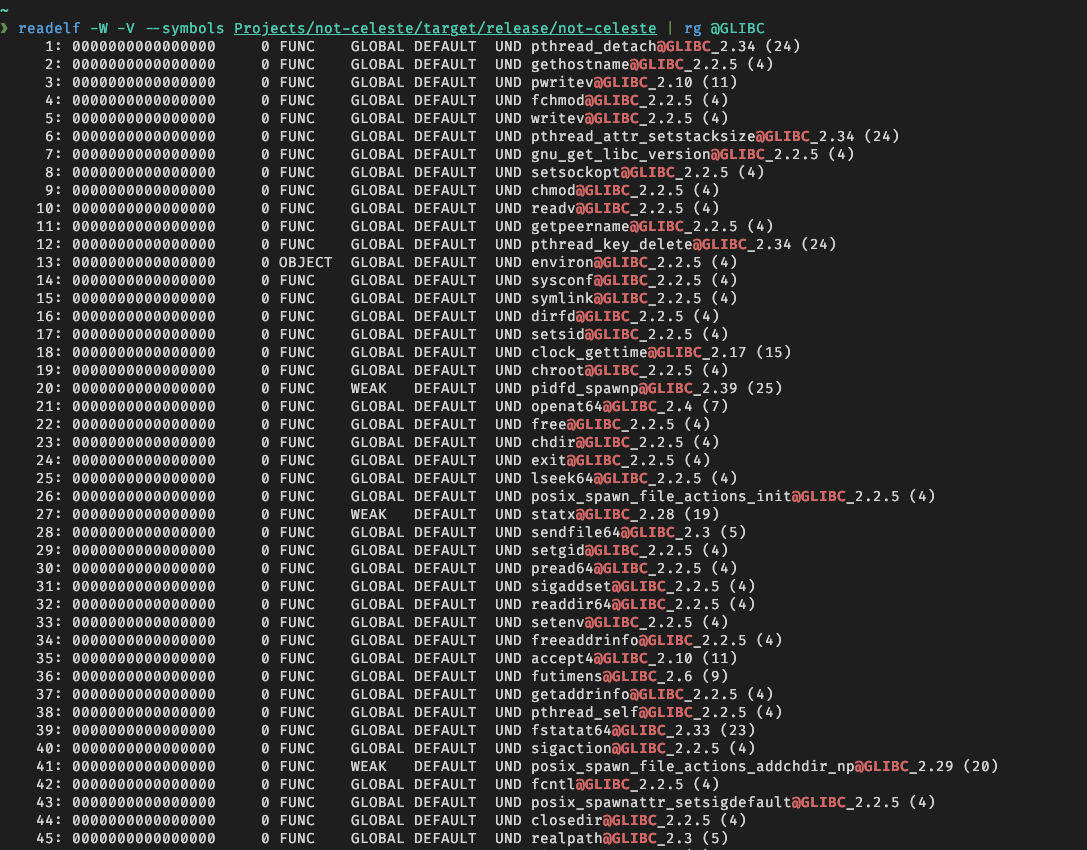
Josh Simmons
dotstdy@mastodon.social@mcc no, you need to check the symbol versions which are bound against.
```
readelf -W -V --symbols Projects/not-celeste/target/release/not-celeste | rg @GLIBC
```
 1
0
0
1
0
0
Josh Simmons
dotstdy@mastodon.social@mcc basically it will depend on what symbols from libc you actually use, and what version of those symbols was the latest version for the particular version of libc that you had installed on the machine where you build those binaries.
1
0
0
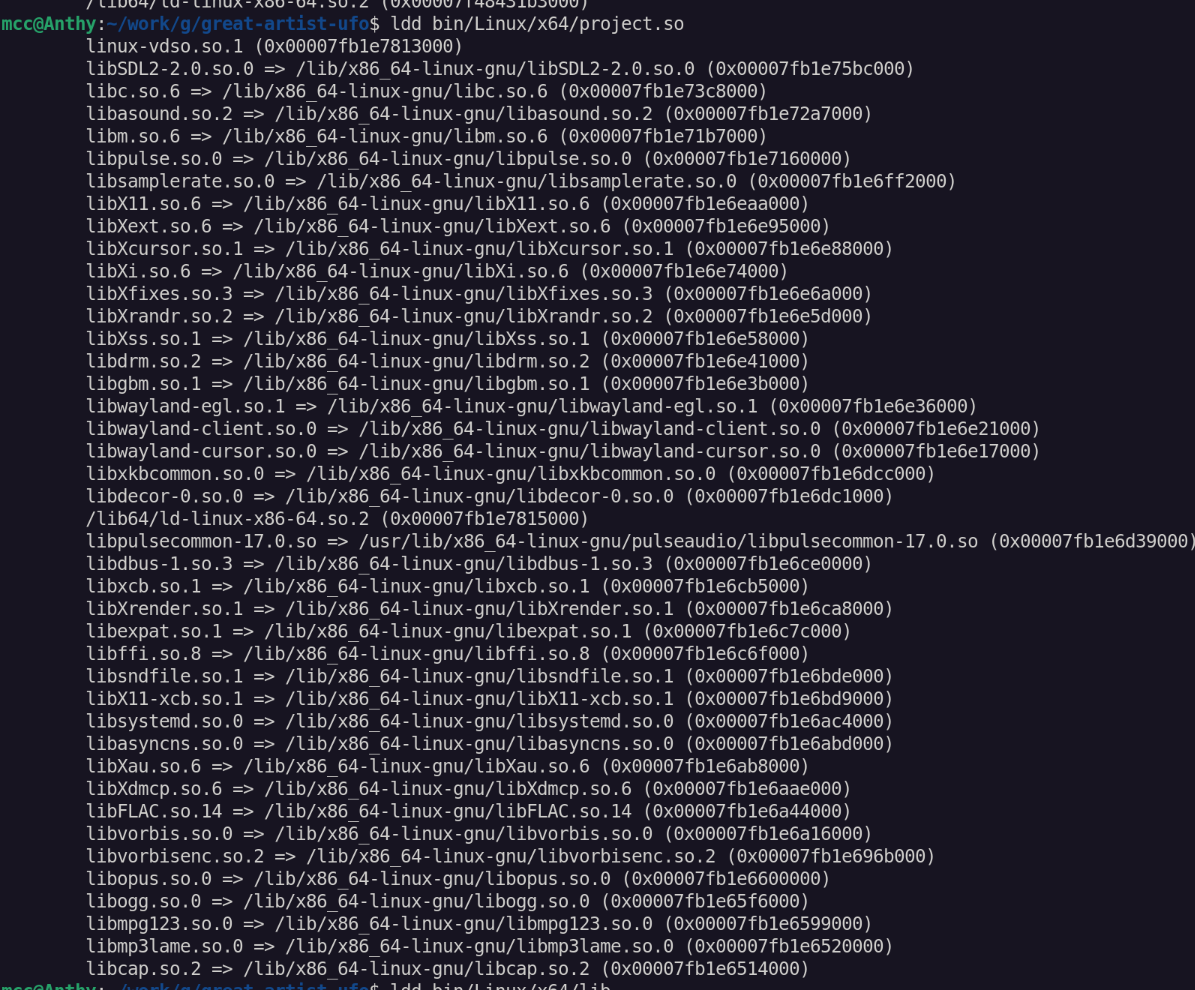
@dotstdy 2. I have a library which I link with gcc [ofiles] -L../../bin/$(OS)/$(ARCH) -lSDL -shared -o project.so . I expect this to link the libSDL.so in ../../bin/$(OS)/$(ARCH) . When I run ldd, I appears to have linked a system SDL as well as many, *many* system libraries, like libflac, libvorbis, libmp3 and libsystemd, that it has no use of. What am I doing wrong, to have taken all these system dependencies?
 1
0
0
1
0
0
@dotstdy Okay. So you've previously asserted there's no way to build with backward compatibility with old libcs other than creating a VM with that old libc and building there, but in addition would you say there is no way to *test* compatibility with an older version of Linux other than creating a VM with an old libc and testing there?
How does one test compatibility with multiple linux distributions? Multiple VMs?
1
0
0
Josh Simmons
dotstdy@mastodon.social@mcc I'm guessing you build the SDL yourself, is there a static archive around when you build your project? I guess it's statically linking with SDL instead of dynamically linking. it should look like this, basically:
 1
0
0
1
0
0

Josh Simmons
dotstdy@mastodon.social@mcc I would probably just check the versions on your imported libc symbols, you shouldn't have any dependencies other than libSDL itself, which we assume can take care of things. But yeah, it's always possible to miss something if you don't actually run it. Distros mostly don't cause problems themselves, so again most common problems would be visible in the symbol table of the executables you build. for example if you start seeing internal glibc symbols in your binary's symbol table that's bad.
1
0
0
@dotstdy I attempted to build SDL myself and somehow did it wrong, so now I'm using a libSDL I was given by an SDL project member, taken from Steam Runtime 4.0.20260608.
ldd'ing not just libSDL (which is actually sdl2-compat) but libSDL3, it seems probably it is the source of most of those additional dependencies. But I am confused why it says libSDL2-2.0.so.0 => /lib/x86_64-linux-gnu/libSDL2-2.0.so.0 .
(Especially considering it refuses to build if the libSDL2-compat is absent in the -L dir)
1
0
0
1
0
0
Josh Simmons
dotstdy@mastodon.social@mcc (which is just another one of those 'why yes i did spend a bunch of time debugging which specific linker invocation was slightly wrong to cause a binary to fail to load on fedora when it was built on a debian sysroot' kinda things... )
0
0
0
Josh Simmons
dotstdy@mastodon.social@mcc If it's not building while the library isn't there that sounds like you're statically linking with it somehow.
2
0
0
@dotstdy My understanding is statically linking is impossible unless a .a files is present. I would be shocked to learn you can statically link against an SO, and anyway, I wouldn't expect a statically linked library to show up in ldd output. Am I missing something?
0
0
0
Josh Simmons
dotstdy@mastodon.social@mcc you shouldn't need to have the library to link against it, just -lSDL without any path. the way the runtime finds that library is a separate thing
1
0
0
@dotstdy if the library is not present, how does it know which symbols the library contains? it seems it must be able to do this because if I link against a function and library provides it, there is an error.
1
0
0
Josh Simmons
dotstdy@mastodon.social@mcc if you do
```
❯ readelf -d target/release/not-celeste | rg Shared
0x0000000000000001 (NEEDED) Shared library: [libc.so.6]
0x0000000000000001 (NEEDED) Shared library: [ld-linux-x86-64.so.2]
0x0000000000000001 (NEEDED) Shared library: [libm.so.6]
0x0000000000000001 (NEEDED) Shared library: [libSDL3.so.0]
0x0000000000000001 (NEEDED) Shared library: [libgcc_s.so.1]
```
Does it show the whole huge list from ldd, or this?
1
0
0
@dotstdy I have binaries for an sdl2-compat and an sdl3 from Steam Runtime 4.0.20260608 . I have a small C library that links against the sdl2-compat (or is meant to do this but instead is doing something awful I don't want). I'm not sure what binary you're proposing I do readelf on.
1
0
0
Josh Simmons
dotstdy@mastodon.social@mcc like the end goal here is that the list of libraries that your library links against is empty except for libc and libSDL then you can `LD_LIBRARY_PATH` or whatever to tell it to use your own SDL. somehow it looks like you're picking up the entire smorgasbord of SDL dependencies into your own library, perhaps via the compat library.
1
0
0
Josh Simmons
dotstdy@mastodon.social@mcc Like, the way you have it now you should be able to start off by removing your vendored libSDL3 and libSDL2-compat, building against the host system's libSDL2, and then using LD_LIBRARY_PATH in the launch script to use a vendored libSDL3 / libSDL2-compat afterwards if you want. That might reduce the number of simultaneous disasters so you can approach these issues one at a time.
2
0
0
Josh Simmons
dotstdy@mastodon.social@mcc For most purposes spinning up an older debian or ubuntu image and then building your library against the host libc and host libSDL2 would get you a very portable binary you could ship (lots of things assume a SDL dependency, including the steam runtimes). Adding the extra hotness to vendor libSDL and interpose it with `LD_LIBRARY_PATH` would then allow it to work even if your host didn't have SDL available.
0
0
0
@dotstdy if I remove the vendored libsdl2/3 it doesn't build. This is the source of some of my confusion. Additionally i expect libsdl2-compat to load libsdl3 dynamically at runtime
1
0
0
Josh Simmons
dotstdy@mastodon.social@mcc yeah but your system has libSDL2 right, you should be able to link against that and ignore the compat stuff entirely. (and then load the compat library without touching your binary at all, either via `LD_LIBRARY_PATH`, or via `SDL_DYNAMIC_LIBRARY`)
0
0
0

@mcc im having a very similar experience over in bootc land right now…
0
0
0